
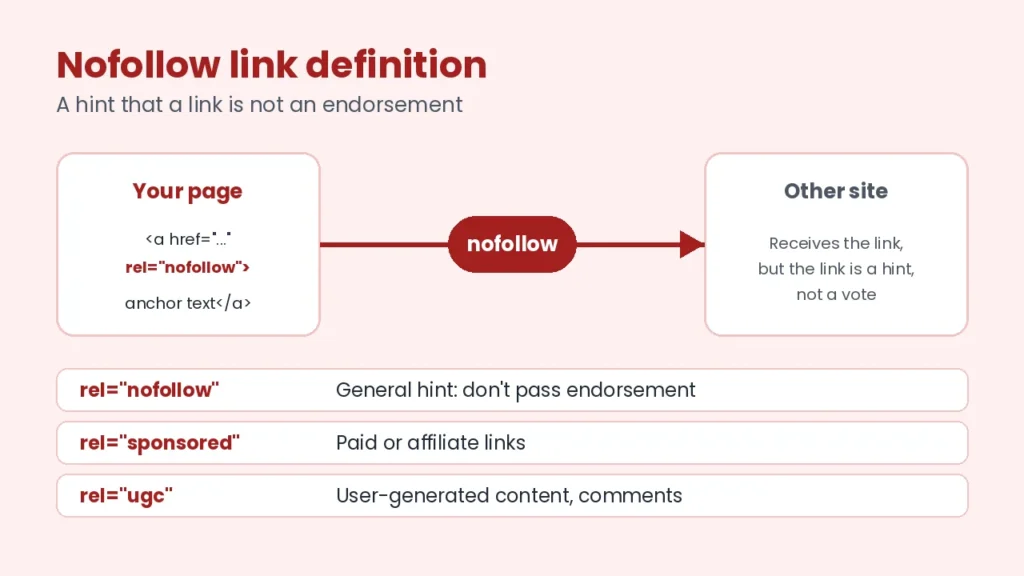
The nofollow link definition is simple: a nofollow link is a hyperlink that carries the attribute rel="nofollow", which tells search engines that the site owner is not vouching for, or endorsing, the page being linked to. Since March 2020 Google treats nofollow as a hint rather than a strict command. This guide explains exactly what that means in practice, how nofollow differs from sponsored, ugc and noindex, when you should use it, how to check whether a link is nofollow, and how to fix the most common mistakes.
Quick answer: A nofollow link is a link marked with rel=”nofollow” so that search engines should not treat it as an endorsement or pass ranking credit through it. Use rel="sponsored" for paid and affiliate links, rel="ugc" for user-generated content, and rel="nofollow" when you simply do not want to vouch for a destination. Google treats all three as hints.
Key takeaways
- Nofollow describes the relationship between two pages. It does not hide a page from search.
- Paid links must be marked as sponsored or nofollow, according to Google’s guidelines.
- Nofollow links still send visitors, build brand awareness and make a backlink profile look natural.
- Nofollow is not the same as noindex. They control different things.
What does a nofollow link look like in code?
A normal link looks like this:
<a href="https://example.com/">Example</a>A nofollow link adds one attribute:
<a href="https://example.com/" rel="nofollow">Example</a>Visitors see no difference. The attribute is a message to crawlers about how to treat the link. You can combine values, for example rel="sponsored nofollow".
A short history of nofollow
- 2005: Google and other search engines introduced nofollow to fight comment spam, so that spammers would gain nothing from dropping links into blogs.
- September 2019: Google announced two new attributes,
rel="sponsored"andrel="ugc", so that site owners could describe links more precisely. See Google’s announcement on evolving nofollow. - March 2020: Google began treating all three attributes as hints for ranking purposes, and for crawling and indexing, rather than strict directives.
Nofollow, sponsored and ugc compared
| Attribute | Use it for | Example |
|---|---|---|
rel="nofollow" |
A link you do not want to endorse or cannot vouch for | A reference to a site you are criticising |
rel="sponsored" |
Paid placements, advertisements, affiliate links | A sponsored post or affiliate product link |
rel="ugc" |
Content created by users | Forum posts, blog comments, reviews |
| No attribute (often called dofollow) | Editorial links you stand behind | A link to a source you trust |
“Dofollow” is not an official attribute. It is simply the everyday name for a link without any rel value. For the buyer’s view of the difference, see our guide Dofollow or Nofollow: What Should You Buy?
Does a nofollow link pass SEO value?
Because nofollow is a hint, there is no guaranteed yes or no. Google’s guidance says that links marked nofollow, sponsored or ugc are generally not used to pass ranking credit, though they may be used as hints when it decides how to crawl and index. In practice, you should plan on the basis that a nofollow link will not boost rankings the way a strong editorial link can. That does not make it worthless:
- Referral traffic. A link in a relevant article can send real visitors who buy or subscribe.
- Brand visibility. People who read about you may later search for your name, which is a strong signal of interest.
- A natural profile. Real sites attract a mix of link types. A profile with only followed links can look engineered.
- Discovery. Links, even hinted ones, can lead crawlers and people to your pages.
To learn more about how links influence performance overall, read do backlinks still matter in 2026.
When should you use nofollow?
- Paid links and sponsored content. Google requires paid links to be qualified. Use
sponsored, optionally together withnofollow. Google’s page on qualifying outbound links explains the rules. - Affiliate links. Mark them
sponsored. - User-generated content. Comments, forum posts and profile fields should use
ugc. WordPress adds this automatically to comment links. - Links to sources you cannot vouch for. If you reference a site only as an example of what not to do, nofollow is appropriate.
When you should not use nofollow
- Normal internal links. Nofollowing your own pages to “sculpt” authority stopped working years ago and tends to make the structure worse. See internal linking for SEO.
- Genuine editorial citations. If you trust a source and want to credit it, a normal link is the honest signal.
- As a way to hide content. Nofollow does not prevent indexing. Use noindex or authentication for that.
Nofollow vs noindex vs robots.txt
| Tool | Where it lives | What it controls |
|---|---|---|
| rel=”nofollow” | On an individual link | How a particular link is treated |
| meta robots noindex | In a page’s head or HTTP header | Whether the page can appear in search results |
| meta robots nofollow | In a page’s head | A hint about all links on that page |
| robots.txt | A file at the root of the site | Which URLs crawlers are allowed to fetch |
Mixing these up causes real damage. A noindex tag removes a page from results. A nofollow attribute on a link does not.
How to check whether a link is nofollow
Method 1: Inspect the link in your browser
- Right-click the link and choose Inspect.
- Look at the highlighted anchor tag in the developer panel.
- If you see
rel="nofollow",rel="sponsored"orrel="ugc", it is qualified. No rel attribute means it is a normal link.
Method 2: View the page source
Press Ctrl+U (or Cmd+Option+U on a Mac), then search for the link’s domain. This works well for checking many links on one page.
Method 3: Use a backlink tool
Backlink checkers label links as followed or nofollow. Remember that each tool reads the page at the time it last crawled it, so confirm important links manually. See our comparison of backlink checker tools, or learn how to check backlinks without paid tools.
How to add a nofollow attribute
In the WordPress block editor
- Select the link text and click the link icon, then Edit.
- Open the Advanced section of the link settings.
- Tick “Mark as nofollow” (the label can vary between WordPress versions).
- For sponsored or ugc, switch to the HTML view of the block and add the value to the rel attribute by hand.
In plain HTML
Add the attribute to the anchor tag: <a href="URL" rel="sponsored nofollow">. For links that open in a new tab, rel="noopener" is also good practice, and values are separated by spaces.
Common nofollow problems and how to fix them
Problem 1: You published paid links without qualifying them
Fix: Add rel="sponsored" or rel="sponsored nofollow" to every paid, affiliate or sponsored link. Audit older posts too. If you are a publisher who accepts guest posts, put this in your policy. If you are a buyer, read how to buy guest posts to understand what sellers should disclose.
Problem 2: A plugin or theme nofollows your internal links
Fix: Crawl your site, filter internal links with rel nofollow and trace the source. Disable the setting in the plugin or theme and re-crawl to confirm. Unintended nofollow on navigation or related-post links is a common cause of weak internal linking.
Problem 3: You confused nofollow with noindex
Fix: If a page must stay out of results, use a noindex meta tag or password protection and make sure it is not blocked in robots.txt, because crawlers must be able to see the tag. If you only wanted to avoid endorsing a link, nofollow is correct.
Problem 4: A valuable backlink turns out to be nofollow
Fix: Judge it by relevance, traffic and audience, not only by the attribute. A nofollow link from a respected publication in your field is still worth having. Do not ask for the attribute to be removed if the link is a paid placement, because that would break the guidelines.
Problem 5: Spammy nofollow links point at your site
Fix: You normally do not need to act. Google says it is good at ignoring spammy links. Consider a disavow only if you have a manual action or a clear pattern of manipulative links. Our toxic backlinks guide covers when that applies.
Problem 6: You nofollowed every outbound link “to be safe”
Fix: Remove the blanket rule. Linking to trusted sources without nofollow is normal and helps readers verify claims. Use qualifiers only for the cases listed above.
Nofollow, E-E-A-T, AEO and GEO
- E-E-A-T: citing credible sources without nofollow shows that you stand behind your references, and clear disclosure of sponsored links shows honesty. Both support trust.
- AEO: a short definition near the top, as in this article, helps search features and assistants quote the answer. Use question-style headings and a brief FAQ.
- GEO: nofollow is a signal about link credit, not a block on reading your content. Pages can still be crawled and understood by search systems. For AI-generated answers, being mentioned and described accurately across reputable pages matters, regardless of the link attribute. Google’s guidance on AI features and your website says that standard SEO practice still applies.
Frequently asked questions about nofollow links
What is a nofollow link?
A nofollow link is a hyperlink with rel=”nofollow”, which signals to search engines that you are not endorsing the destination or passing ranking credit through the link.
Do nofollow links help SEO?
They are generally not a direct source of ranking credit, but they can bring traffic, awareness and a more natural link profile.
What is the difference between nofollow and sponsored?
Nofollow is a general-purpose hint. Sponsored specifically identifies paid, advertising or affiliate links. Both are acceptable for paid placements.
Is nofollow the same as noindex?
No. Nofollow applies to links. Noindex applies to a page and asks search engines not to show it in results.
Should internal links be nofollow?
Generally no. Internal links should help crawlers and visitors move through your site.
Do I need to add nofollow to affiliate links?
Yes. Google recommends marking affiliate links with rel=”sponsored”, and nofollow is also accepted.
Related reading: rel dofollow: does it exist?, toxic backlinks and when to disavow and backlinks not showing in Google Search Console.
Conclusion
The nofollow link definition boils down to one idea: a nofollow link is a link you tag so that search engines know not to count it as your endorsement. Use sponsored for anything paid, ugc for user content and nofollow when you cannot vouch for a destination. Keep normal links normal, check your site for accidental nofollow, and judge backlinks by their relevance and audience, not by one attribute. If you are building a link profile, see how Markwood works for how placements are ordered and how link attributes are handled.