
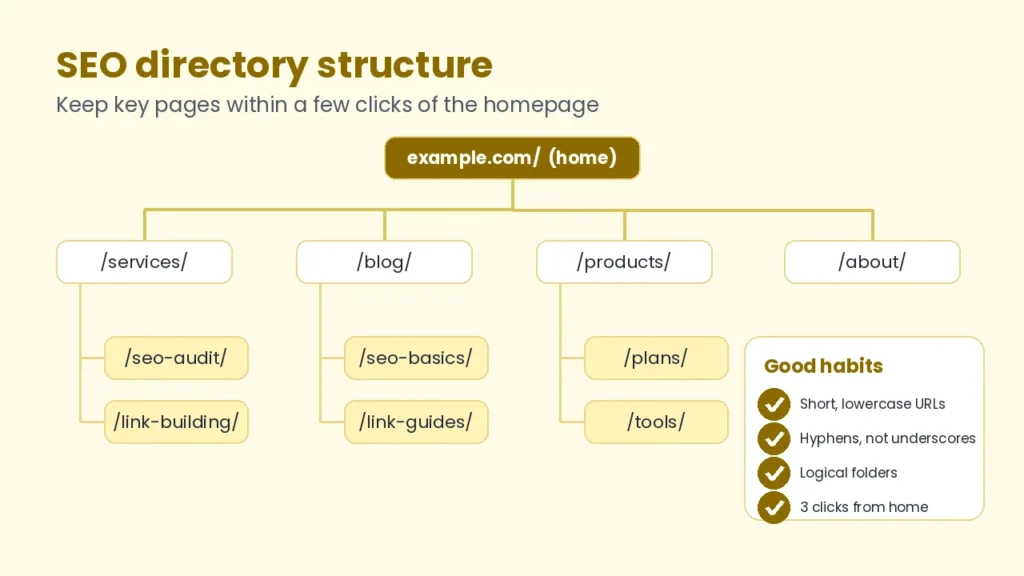
An SEO directory structure is the way your website’s folders, URLs and page hierarchy are organised so that visitors and search engines can understand how everything fits together. In a URL such as example.com/services/seo-audit/, the parts after the domain are directories (also called folders or paths). Getting them right will not magically rank a weak page, but a clear structure makes crawling easier, spreads internal links sensibly and helps people find what they need. This guide shows how to plan a directory structure, which rules matter, how to avoid common problems and how to restructure an existing site without losing traffic.
Quick answer: A good SEO directory structure is logical, shallow and consistent. Group related pages under clear category folders, keep URLs short, lowercase and readable with hyphens between words, keep important pages within about three clicks of the homepage, and use one canonical version of every URL. If you change a structure, redirect every old URL to its new address with a 301.
Key takeaways
- Folders in a URL should mirror how a visitor thinks about your content, not how your team is organised.
- Click depth from the homepage matters more than how many slashes appear in the URL.
- URL words are a minor ranking signal, but they help people understand a link before they click.
- Restructuring is safe only with a complete redirect map, updated internal links and a fresh sitemap.
What is an SEO directory structure?
Think of your site as a filing cabinet. The domain is the cabinet, each top-level folder is a drawer, and each page is a document in a drawer. A directory structure is simply that arrangement written into your URLs. It shows up in three places: the address bar, your navigation menus and your breadcrumbs, and all three should tell the same story.
Search engines use URLs and internal links to discover and group pages. Google’s documentation on URL structure best practices advises using simple, descriptive URLs and avoiding unnecessarily complex parameters. Clear folders make that easier to follow.
Flat vs deep directory structures
| Type | Example | Best for | Watch out for |
|---|---|---|---|
| Flat | example.com/seo-audit/ | Small sites, blogs, simple service sites | Becomes messy past a few dozen pages |
| Shallow hierarchy | example.com/services/seo-audit/ | Most business sites | Choosing category names that are too vague |
| Deep hierarchy | example.com/shop/men/shoes/running/trail/ | Large catalogues | Pages buried too many clicks from the homepage |
Neither flat nor deep is automatically better. Google has indicated in public Q&A that distance from the homepage in clicks matters more than the number of folders in the address. A page at /a/b/c/d/ that is linked from the homepage is closer to the top of your site than a “flat” page that no one links to. What matters is that important pages are easy to reach and clearly related to their neighbours.
Rules for URLs and folders that work
- Use readable words.
/seo-audit/beats/page?id=4821. - Use hyphens between words. Google recommends hyphens over underscores because they read as word separators.
- Use lowercase. Paths can be case-sensitive on some servers, so mixed case invites duplicate URLs.
- Keep it short. Remove filler words and dates unless the date really matters.
- Make folders meaningful. Each folder name should describe the group of pages inside it.
- Be consistent. Decide once on trailing slash or no trailing slash, and keep to it.
- Avoid changing URLs without a reason. Every change risks lost signals and broken links.
- Avoid session IDs and unnecessary parameters in indexable URLs.
Subdirectory vs subdomain
A subdirectory looks like example.com/blog/. A subdomain looks like blog.example.com. Google has said that it can handle both, but subdirectories are usually simpler to manage because they keep everything under one site, one set of reports and one pool of links. Use a subdomain only when there is a real technical or organisational reason, such as a separate platform or a distinct brand.
How to design an SEO directory structure, step by step
Step 1: List every page type you have or plan to have
Typical types include homepage, services, products, categories, articles, location pages, resources and contact. Export a crawl or sitemap if the site already exists.
Step 2: Group them by topic and by what visitors want
Start from your core topics and the questions behind them. If you are planning content, our guide to keywords vs topics in SEO explains how to build topic groups that translate naturally into folders.
Step 3: Choose three to eight top-level sections
Too many sections overwhelm visitors, and too few cram unrelated pages together. Name each section with the word your customers use, not your internal jargon.
Step 4: Limit depth
Aim for most pages to be reachable within three clicks of the homepage. If a section needs more levels, add direct links from hub pages or navigation so that deep pages are not isolated.
Step 5: Write URL patterns, not one-off URLs
Define a pattern for each page type, such as /services/[service-name]/ or /guides/[topic]/. Patterns keep the structure consistent as the site grows and make redirects and reporting easier.
Step 6: Build navigation and breadcrumbs that match the folders
If a page lives under /services/, its breadcrumb should show Home, Services, then the page. Consistency helps visitors, and breadcrumb markup can help search engines understand the hierarchy.
Step 7: Connect pages with internal links
Folders alone do not pass relevance. Links do. Link each page to its parent hub, to related siblings and to the next logical step. Our guide on internal linking for SEO covers anchor choices and orphan page fixes.
Step 8: Submit a sitemap and monitor indexing
List only canonical, indexable URLs in your XML sitemap, submit it in Google Search Console and watch the Pages report for errors. You can also read our walkthrough of Google Search Console reports.
Directory structure on WordPress
In WordPress, go to Settings, then Permalinks. “Post name” gives clean URLs such as /seo-directory-structure/. You can add a category base if you want folder-style paths, though many blogs prefer the shorter version. Avoid plain permalinks such as ?p=123, and do not change the permalink structure on a live site without a full redirect plan. Parent and child pages let you build hierarchies like /services/seo-audit/ for static pages.
Common directory structure problems and how to fix them
Problem 1: Important pages are buried too deep
How to spot it: Run a crawl and look at click depth. Pages four or more clicks away that matter commercially are candidates.
Fix: Add links from the homepage, main navigation or a hub page. Consider moving the page to a higher-level folder if it has outgrown its current section.
Problem 2: The same page loads at several URLs
How to spot it: Check whether http, https, www, non-www, trailing slash and uppercase variants all load without redirecting.
Fix: Choose one preferred version and 301 redirect the rest to it. Add self-referencing canonical tags and ensure internal links use the preferred form only.
Problem 3: Orphan pages
How to spot it: Compare the URLs in your sitemap with those found by a crawler that follows links. Pages in the first list but not the second have no internal links.
Fix: Link to each orphan from at least two relevant pages, or remove or redirect it if it no longer serves a purpose.
Problem 4: Category sprawl and thin folders
How to spot it: Folders that contain one or two pages, or dozens of near-identical category pages.
Fix: Merge small categories into broader ones, redirect the old paths and rewrite the hub page so it genuinely helps visitors.
Problem 5: URLs full of dates, IDs or parameters
Fix: Move to descriptive slugs. Only restructure live URLs if the benefit outweighs the risk, and always use 301 redirects. For filters and tracking parameters, use canonical tags or robots rules so that crawlers do not waste time on endless variations.
Problem 6: Navigation and URLs disagree
Fix: Update the menu, breadcrumbs and URL patterns so a page is always found in the same place. Inconsistency confuses both people and crawlers.
How to change your directory structure safely
- Back up the site and record baseline traffic and rankings.
- Crawl the existing site and export every URL.
- Create a redirect map pairing each old URL with its new one. Redirect to the most relevant page, not blindly to the homepage.
- Implement 301 redirects and test a sample of them, then test every important page.
- Update internal links, navigation, canonical tags and the sitemap so that nothing points to a redirect.
- Inform external partners where practical, especially if high-value links point to old addresses.
- Monitor Search Console for crawl errors and traffic changes for several weeks, and fix problems quickly.
Expect some temporary movement after a restructure. Keep redirects in place for as long as you can, ideally permanently for pages with external links.
Directory structure, E-E-A-T, AEO and GEO
- E-E-A-T: make trust pages easy to find. Place About, Author, Contact, policies and review information in obvious locations, such as top-level pages. Show who wrote each guide and when it was reviewed.
- AEO: group answers by question in clearly named sections, for example
/guides/or/faq/, and give each page one precise answer-first purpose. - GEO: a consistent hierarchy helps AI systems understand which pages belong together and which is the main source on a subject. Use descriptive headings, breadcrumbs and internal links that make the relationship between pages obvious. Google notes that its AI features rely on the same foundations as regular search, so crawlable, well-linked pages remain the basis.
An example structure for a small business site
| Section | Example URL | Purpose |
|---|---|---|
| Home | / | Overview and routes to key sections |
| Services | /services/ and /services/seo-audit/ | Commercial pages for each service |
| Guides | /guides/ and /guides/nofollow-link-definition/ | Educational content and topic clusters |
| About | /about/ and /about/team/ | Trust, experience and authorship |
| Contact | /contact/ | Conversion and local information |
Small sites can use a flat approach like this site does for its guides, and still be well organised, because tags, categories, navigation and internal links do much of the grouping work.
Frequently asked questions about SEO directory structure
What is a directory structure in SEO?
It is the folder-based hierarchy of your website’s URLs, reflecting how pages are grouped and how they link to each other.
How many levels should a URL have?
Most sites work well with one to three levels. More are fine for large catalogues, provided important pages remain easy to reach through links.
Do folders in URLs affect rankings?
Words in URLs are a minor signal. The bigger benefits are clearer organisation, easier crawling and better user experience.
Is it better to use a subdirectory or a subdomain?
Subdirectories are usually simpler and keep authority in one place. Choose a subdomain only for a clear technical or brand reason.
Should I change my URLs to include a category?
Only if there is a clear benefit, such as a confusing structure on a growing site. Changing working URLs always carries risk, so use a full redirect map.
Do I need breadcrumbs?
They are not required, but they help visitors understand where they are and give search engines a clear view of your hierarchy.
Conclusion
A strong SEO directory structure is a quiet advantage. It makes your site easier to crawl, easier to navigate and easier to extend as you add content. Plan your sections around topics people actually search for, keep URLs readable and consistent, link pages to their neighbours and treat any change to live URLs as a project with a redirect map. For the content side, continue with what anchor text is in SEO and the latest SEO tips for 2026.