
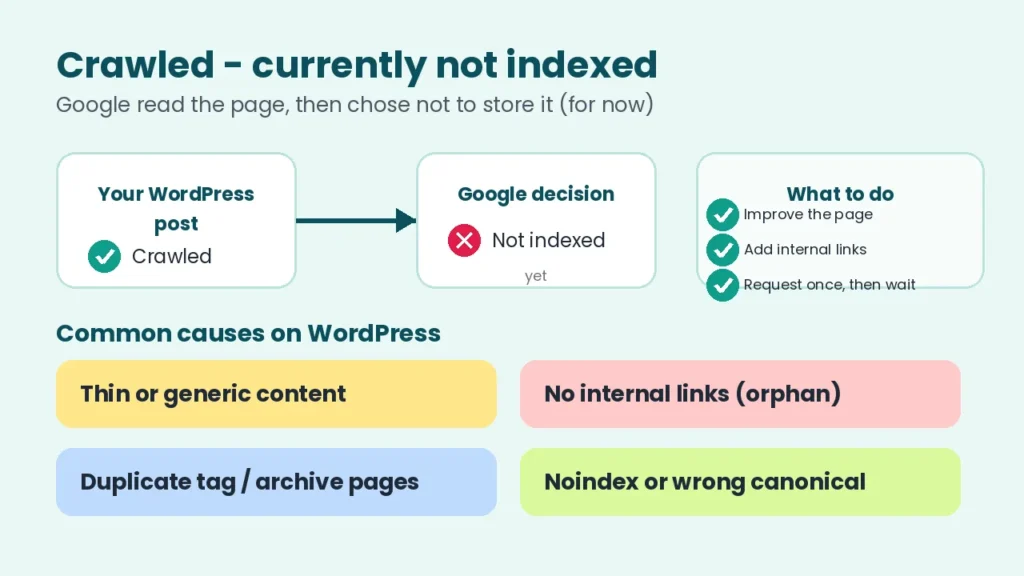
If you see crawled currently not indexed in Google Search Console for your WordPress site, it means Google visited the page, read it, and decided not to add it to its index for now. The page can still be indexed later, but waiting rarely fixes it on its own. This guide explains what the status means, which URLs you can safely ignore, the most common WordPress causes, and a 9-step fix you can follow in order, with a realistic timeline.
Quick answer: “Crawled – currently not indexed” is a quality or value decision, not a crawling error. Fix it by checking that the page is indexable, improving it with original, answer-first content, linking to it from strong pages, removing duplicates and thin archive pages, then requesting indexing once and waiting a few weeks. Repeated resubmission does not help.
Key takeaways
- Not every URL in this report needs fixing. Tag pages, feeds and parameter URLs often belong there.
- For real posts and pages, the usual causes are thin content, no internal links, duplicates and low perceived value.
- A WordPress SEO plugin or a theme setting can quietly create duplicate or low-value URLs.
- Improve the page first, then request indexing once. Fixes commonly take a few weeks to show.
What does “crawled currently not indexed” mean?
Google’s page indexing report uses this label when Googlebot fetched a URL but chose not to include it in the search index. Google notes that the page may or may not be indexed in the future, and that you do not need to ask for it to be crawled again. In other words, crawling worked. The decision happened afterwards.
It is easy to mix this status up with its neighbour, so here is the difference:
| Discovered – currently not indexed | Crawled – currently not indexed | |
|---|---|---|
| What happened | Google knows the URL but has not fetched it yet | Google fetched and read it, then did not index it |
| Typical cause | Low crawl priority, weak internal links, slow server, very large sites | Page quality, duplication, low value, weak signals |
| Where to fix | Site-level: links, sitemap, speed, crawl waste | Page-level: content, uniqueness, links, canonical |
Is it a problem? Which URLs can you ignore?
Open the report and look at the URLs before doing anything. WordPress creates many URLs that you do not want in search results, and seeing them here is normal:
- Tag, author and date archives with only one or two posts.
- Feed URLs (
/feed/) and comment feeds. - Attachment pages for images.
- Parameter URLs such as
?replytocom=,?s=or tracking parameters. - Paginated archive pages (
/page/2/).
Treat the status as a problem only when it affects pages that should earn traffic: your posts, service pages, product pages and category pages that you want to rank.
Why WordPress sites get this status: causes and quick checks
| Cause | How to spot it | Fix |
|---|---|---|
| Thin or generic content | Short post, repeats what top results say, no original angle | Rewrite with first-hand detail, examples and a direct answer |
| No internal links (orphan page) | Page is not linked from any other page | Link from relevant posts, a hub page and a category |
| Duplicate or near-duplicate pages | Several posts cover the same keyword | Merge, redirect or differentiate the intent |
| Wrong canonical tag | URL Inspection shows a different “Google-selected canonical” | Fix the canonical in your SEO plugin or theme |
| Low-value archives | Tag and author pages in the report | Noindex or remove thin archives |
| New domain with little authority | Site is recent, few external links | Improve quality, earn a few relevant links, be patient |
| Slow or unstable hosting | Server errors, long load times in crawl stats | Upgrade hosting, enable caching, reduce plugins |
| Content hidden behind scripts | Rendered HTML in URL Inspection lacks main text | Ensure main content is in the HTML or rendered reliably |
9 steps to fix crawled currently not indexed in WordPress
Step 1: Export the affected URLs
In Google Search Console, go to Indexing, then Pages. Scroll to “Why pages aren’t indexed” and click “Crawled – currently not indexed”. Use Export to download the list. Paste it into a spreadsheet so that you can sort and tick URLs off.
Step 2: Sort the URLs into “keep” and “ignore”
Add a column called Type. Mark each URL as post, page, category, tag, author, attachment, feed or parameter. Mark the junk as “ignore” and focus on the posts and pages that should be indexed. Many sites find that the real problem list is far shorter than it looked.
Step 3: Inspect each important URL
Paste the URL into the URL Inspection tool and run a live test. Check that the page is allowed to be indexed, that the user-declared canonical and Google-selected canonical match, and that the rendered HTML shows your actual content. If Google picked a different canonical, you have a duplication problem rather than a quality problem.
Step 4: Check your WordPress and SEO plugin settings
- Settings, then Reading: make sure “Discourage search engines from indexing this site” is unticked.
- Your SEO plugin: confirm that posts and pages are set to be indexed, and that thin archives (tags, authors, date archives) are noindexed if you do not need them.
- Canonicals: confirm that each post has a self-referencing canonical, unless it is a deliberate duplicate.
- Attachment pages: redirect them to the parent post or file so they do not create empty pages.
A healthy post should have a head section similar to this, with no noindex and a canonical pointing at itself:
<link rel="canonical" href="https://example.com/your-post/" />
<!-- no meta robots "noindex" on posts you want in search -->
Step 5: Make the page worth indexing
This step matters most for posts. Google’s guidance on helpful, reliable, people-first content asks whether a page offers original information, real expertise and a satisfying answer. Practical changes:
- Open with a direct answer in two or three sentences.
- Add something competing pages lack: your own screenshots, a worked example, a checklist from real experience, a comparison table or a fresh data point.
- Remove filler paragraphs that repeat the heading or pad word count.
- Match search intent. If top results are step-by-step guides, write a guide, not an opinion piece.
- Add a named author, a short bio, a review date and sources.
Length is not the goal. A tight 900-word post with unique insight can outperform a padded 2,500-word one. Generic text that could have been written about any site is the type of content that tends to sit in this status.
Step 6: Add internal links from strong pages
Internal links tell Google that a page matters and help it find the page again. Add three to five links from your best-performing, relevant posts, using descriptive anchor text, and link the page from its category or hub page. Our guides on internal linking for SEO and anchor text explain how to do this well, and SEO directory structure shows how to keep important pages close to the homepage.
Step 7: Resolve duplicates and keyword overlap
Search your own site for the page’s main phrase. If two or three posts compete for it, merge the best material into one strong page, redirect the others with a 301, and update internal links. If they serve different intents, rewrite the titles and headings so that each clearly targets its own query. Our guide on keywords vs topics in SEO covers how to assign one primary keyword per page.
Step 8: Clean up low-value pages
A site full of thin pages can lower how Google perceives the whole site. Review tag pages with a single post, empty categories, old test pages and outdated posts with no traffic or links. Delete them, redirect them to a relevant page, or noindex archives that serve users but not search. Do not mass-noindex your real posts to make the report look tidy.
Step 9: Request indexing once, update the sitemap, then wait
After making real improvements, use URL Inspection and click Request Indexing one time per page. Confirm that the page is in your XML sitemap with a current last-modified date, and that the sitemap is submitted in Search Console. Then wait. Many practitioners report that pages clear within one to four weeks after meaningful fixes, but no one can promise a date. If a few relevant sites link to the page, discovery and trust usually improve. See how to get backlinks indexed faster and what to do when a guest post is not indexed for safe ways to speed up discovery.
A 15-minute triage checklist
- Is this URL a post or page you actually want to rank? If not, ignore it.
- Does the live test say the page can be indexed?
- Do the user-declared and Google-selected canonicals match?
- Is the page linked from at least three relevant pages?
- Does it say something that the top-ranking pages do not?
- Is another page on your site targeting the same query?
- Is there a named author, a date and at least one credible source?
If you answered “no” to any of questions 2 to 7, that is where to start.
What does not work
- Clicking Request Indexing again and again. It does not raise priority, and Google says resubmission is not needed for this status.
- Mass pinging or “instant indexing” tools. They may get a page crawled, but they do not make it worth indexing.
- Buying low-quality links. Weak links do not fix weak pages and can create new problems. If you plan to build links, read how to buy guest posts first.
- Rewriting with generic AI text. Unreviewed text that adds no experience or new information often leads to the same result.
- Changing URLs without a plan. You will create new redirects and new problems.
Special cases
A brand-new website
New domains have little track record, so Google is selective. Publish fewer, better pages, link them together, get a handful of relevant mentions and keep the site fast. Index growth tends to follow quality, not volume.
Lots of AI-assisted posts
Using AI as a drafting aid is not forbidden, but publishing large volumes of unedited text is a common reason for this status. Add original experience, check every fact, remove generic filler and have a real person stand behind the page.
An online store
Filtered and sorted product URLs, near-identical product variants and thin category pages commonly appear. Canonicalise variants to the main product, noindex low-value filter combinations and write unique descriptions for the products that matter most.
How this connects to E-E-A-T, AEO and GEO
- E-E-A-T (Experience, Expertise, Authoritativeness, Trustworthiness) is not a technical switch, but pages that show who wrote them, how they know the subject and where facts come from give Google more reason to keep them. Add bylines, bios, review dates and citations.
- AEO (Answer Engine Optimisation): a short, direct answer at the top of the page, question-style headings and a brief FAQ make a page more useful, which supports both indexing and answer features.
- GEO (Generative Engine Optimisation): if a page is not indexed, it cannot be shown as a supporting link in Google’s AI features. Google’s documentation on AI features and your website explains that a page must be indexed and eligible to appear with a snippet. Fixing indexing is therefore the first step towards being cited. We cover the next steps in our guide on how to get cited in AI Overviews.
Frequently asked questions about crawled currently not indexed
What does “Crawled – currently not indexed” mean?
Google fetched the page but decided not to add it to its search index for now. It is a decision about value or duplication, not a crawling failure.
How long does it take to fix?
It varies by site and page. Many sites see changes within a few weeks of real improvements, but it can take longer, and some pages may never be indexed if they add little value.
Should I keep clicking Request Indexing?
No. Request it once after you improve the page. Repeated requests do not help.
Is crawled currently not indexed bad for SEO?
Only if the affected pages are ones you want to rank. For tag pages, feeds and parameter URLs, it is normal and usually harmless.
Does having many pages in this status hurt my whole site?
Large numbers of thin or duplicate pages can suggest overall low quality, so cleaning them up is sensible. Google does not publish a penalty for the status itself.
What is the difference from “Discovered – currently not indexed”?
“Discovered” means Google knows the URL but has not crawled it. “Crawled” means it has crawled it and chose not to index it.
Conclusion
Crawled currently not indexed on a WordPress site is rarely a mystery once you sort the URLs. Ignore the junk, then give each important page a reason to exist: unique value, a clear answer, internal links, a correct canonical and a named author. Request indexing once, clean up thin pages and give the changes a few weeks. For deeper link-related causes, continue with backlinks not showing in Google Search Console.